

How to Delete a WordPress Plugin (Including 3 Top Recommended Plugins Your Website Needs)
Table of Contents
WordPress plugins are incredibly fun to install and customise to help you get your blog looking exactly how you want it to.
But overtime, you might end up with plugins installed in your WordPress Dashboard that you’re no longer using. Perhaps they were pre-installed when you first set up your WordPress account, or perhaps you’ve switched to a different plugin and left the old plugins just sat there.
But having excess plugins on your blog that you aren’t using can:
- Significantly slow your blog’s speed
- Decrease your blog’s security
- Eat into your blog’s storage
- Increase your WordPress maintenance activity
In this blog post, I’m going to walk you through the easiest way to delete unused WordPress plugins so that you can have your blog running at its optimum speed and performance.
How to Delete Unused WordPress Plugins
To find the plugins installed in your WordPress, hover over ‘Plugins’ in the left-hand menu on your WordPress Dashboard and click ‘Installed Plugins.’
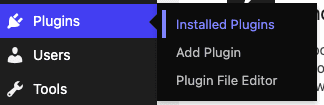
You will then be able to see all of the plugins installed on your website. All active plugins will have a blue background, whereas deactivated plugins will have a white background.
Locate the plugin that you no longer want or need on your blog. If it isn’t already deactivated, click ‘Deactivate.’

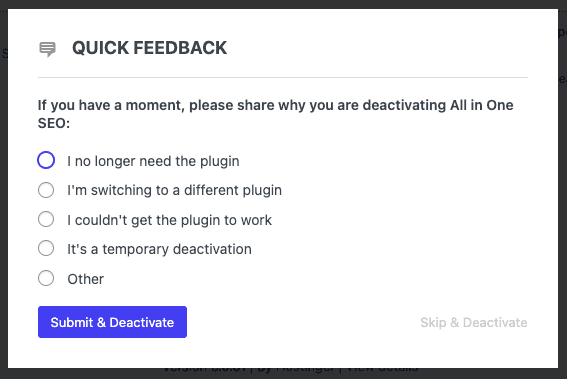
Depending on the plugin, you might be asked for feedback as to why you’re getting rid of the plugin. Fill out this form if presented with one, or skip giving feedback. Different plugins will have different forms and some won’t have any. If there is a form, it’ll look similar to the one below.
Now the plugin is deactivated, you’ll see that it’s background is white now.
Click ‘Delete’ underneath the plugin’s name.

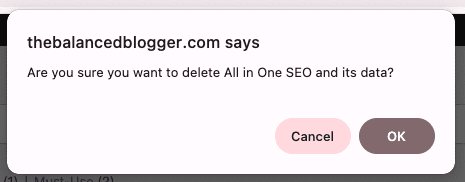
A pop-up will appear asking if you’re sure that you want to delete this plugin.
Click ‘Ok.’
That’s it, you’ve deleted the unused plugin!
The plugin list will refresh to reflect these changes. At this point, I also suggest purging your cache to ensure that removing the plugin doesn’t affect the end-user experience for your reader.
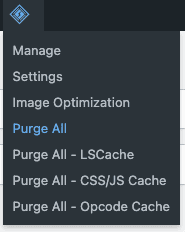
If using LiteSpeed Cache, hover over the LiteSpeed icon at the top of the Dashboard and click ‘Purge All.’
What is a WordPress Plugin?
A WordPress plugin is similar in concept to a piece of software that you install on your WordPress website to add extra features and functionality. The great thing about adding features and functionality through plugins is that you can enhance your website without needing to know how to code.
If you’re building a website for your podcast, WordPress plugins are what turn a very basic website into a fully functioning podcast hub that serves you and your audience in a variety of different ways.
For example, a WordPress plugin can help you:
- Embed and display your podcast episodes, including episode transcripts
- Create a podcast player on your homepage
- Improve your website’s SEO so new listeners can find your show
- Speed up your website so your content loads quickly
- Add contact forms and collect email newsletter sign-ups
Don’t get me wrong, WordPress itself is a great platform, but a basic WordPress website can only do so many things. It’s plugins that are what allow you to tailor your site specifically to you and your podcast’s needs.
When adding plugins to your website, though, it can be easy to get carried away. You need to remember that each WordPress plugin adds code to your website. Therefore, it’s important to only install and keep the WordPress plugins that actively support your podcast website and your listeners.
Unused plugins don’t add value, and they can actually end up working against your site’s performance. When left unused, they simply become digital clutter, which is exactly why deleting unused plugins matters.
Recommended of Plugins For Your Podcast Website
There are a tonne of plugins out there that you can use to enhance your podcast website, but a few that you might want to check out include:
Wordfence
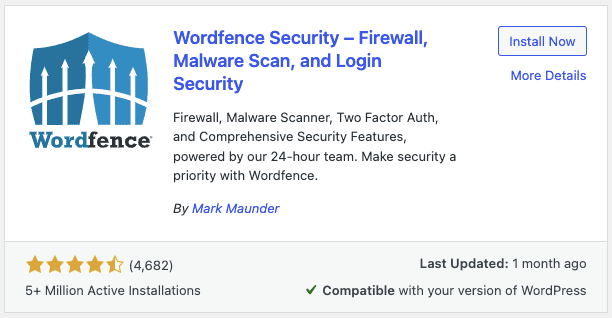
Wordfence is a plugin that helps to protect your website from hacks and security threats. There’s a free version that is super simple to install.
AntiSpam Bee
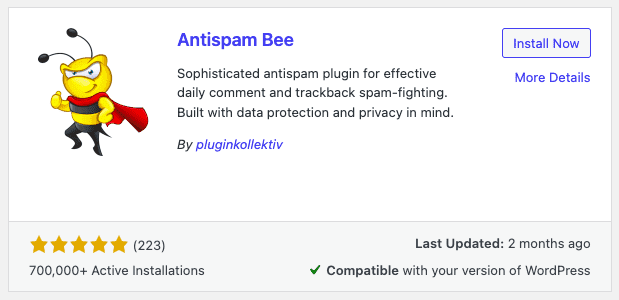
If you have comments enabled on your blog posts, then an antispam plugin is a must. This will prevent your blog from being filled with spammy comments that could seriously slow or break your site.
We use AntiSpam Bee, an easy-to-install and free plugin that is quick to configure and quietly protects your blog in the background whilst you’re busy creating your website’s content.
PrettyLinks
If you’re looking to use affiliate links on your podcast website, then you might want to have these links all look uniform and on-brand. This is easy to achieve using a plugin such as PrettyLinks.
Check out our full blog post on PrettyLinks >> How To Cloak Affiliate Links Using Your Podcast’s URL
Why Do I Need To Uninstall and Delete Unused Plugins?
WordPress plugins are like apps on your phone. Your phone will work perfectly well without additional apps, but adding apps gives your phone so many more functions.
It’s similar with WordPress and plugins.
Without plugins, your site will work absolutely fine, but with plugins, you can have pretty much endless options when it comes to customising your blog and making it look and do so much beyond its basic design.
But hanging onto plugins that you’re no longer using is a huge no-go. Here are the main reasons why you need to delete your unused website plugins:
1. Improve Your Website Speed
The more that is on your website, the slower it’ll be.
It’s like carrying anything you don’t need, it slows you down. Do you take extra things that you don’t need with you on a trip to the shops? No. Because the more that you carry, the slower you’ll be. The same can be said for your website. Therefore, to improve your website’s speed, delete what you aren’t using, including plugins.
2. Improve Your Blog’s Security
I know, I talk about website security a lot, but it’s important. An unused plugin on your site means that you have code that is on your blog that’s not needed and potentially with outdated code.
And outdated code is a problem, because it creates vulnerabilities that hackers and bots can use to hack your blog.
3. Increases Your Blog’s Storage
If you’re anything like me, you don’t think much about your blog’s storage. But every blog and website has a storage limit that is set by their hosting.
True, most blogs will never go near their set limit, but there’s no point in having content stored on your site that’s not needed. By deleting unused WordPress plugins, you can create space for things that actually matter, such as images, written content, plugins, or anything else that you can think of that will actually improve your blog.
4. Simpler WordPress Maintenance
The more plugins that are on your site, the more maintenance you have to do. Yes, this might just include clicking ‘Update’ on an unused plugin that’s now out of date. But why waste the time when you could be using that time to create content?
And yes, you can set WordPress so that it auto-updates plugins. But some plugins won’t allow auto-updates meaning that you need to manually update them.
My tip here is to save time and get rid of what you aren’t using, and therefore simplify your WordPress maintenance.
What if I Change My Mind About a Plugin?
If you delete a plugin (maybe because you decided you no longer need it or you wanted to try a similar plugin) and then want to change it back, don’t stress. You simply need to reinstall the original plugin that you had previously deleted and activate it.
Often, after reinstalling a plugin, the settings from your previous install might re-activate themselves; or you might need to set the plugin up all over again. This completely depends on the plugin. But generally speaking, it isn’t the worst thing in the world to change your mind and reinstall a plugin that you actually want back.

Verity Sangan
Hey! I'm Verity. I love all things podcasting and am passionate about helping more women to find their voice through podcasting. When I'm not working or busy with mum duties, I host Podcasting for Indie Podcasters (formerly The Lazy Girl's Guide to Podcasting).






One Comment
Pingback: