How to Record a Podcast Interview Remotely (Tools and Tips to Host the Best Interview)
Table of Contents
When it comes to being a podcast host, chances are that you’ll end up hosting a podcast interview at some point. And even bigger chances are that you’ll have to record a podcast interview remotely.
It never ceases to amaze me how podcasters have the luxury of being able to interview people globally for their shows and distance between a host and their guest is no longer a barrier.
But whilst recording a podcast interview remotely might seem like second nature to a seasoned podcaster, there are some things you can do to make it easier if you’ve never hosted or recorded a podcast interview remotely before, or even if you have but want some more advice on how to refine this process.
Previously, we discussed how to plan to host a podcast interview, and you can go back and read that blog post here: How to Prepare to Host a Podcast Interview to Get the Best Out of Your Podcast Guests. In this post, we are going to focus more on the recording side of things and look at how to record a podcast interview remotely so that you and your guest get the best experience out of a podcast interview that you can.
5 Remote Podcast Recording Tools
It’s safe to say that in 2026 podcasters are really spoiled for choice when it comes to finding software to record a podcast interview remotely on.
A few choices that spring to mind when it comes to choosing recording software include:
1. Descript
Descript is largely where I currently record and edit all of my podcast episodes. I find it easy to use, and depending on the features you need, they have plans ranging from $0 to $50 per month.
Within Descript is something called Descript Rooms, where you can record yourself and your guest(s) for your podcast episode, completely remotely.
Descript Rooms continually uploads your interview, so in the worst-case scenario that your guest’s internet cuts out, your recording is still intact.
2. Riverside.fm
Riverside.fm is another popular podcast recording and editing platform, which enables you to record podcast episodes with guests. Plans for Riverside start from $24 per month.
Just like Descript, Riverside records locally and continually uploads your recording to their storage so that you have the best audio and visual, plus your recording shouldn’t get lost if someone’s internet drops out.

3. Zencastr
Zencastr is a podcast recording and editing platform that I used for a while a few years back. It’s straight-forward to use and works in similar ways to Descript and Riverside.
In my opinion, Zencastr probably has the best free plan when compared to Riverside and Descript, as the free plan allows you to have unlimited video and audio recording minutes for both solo and guest-related podcasting projects.
Like Riverside and Descript, Zencastr records locally and continually uploads your recording, so your recording shouldn’t get lost if someone’s internet drops out.
If you feel the need to upgrade, plans start from $24 per month.
4. Streamyard
I have used Streamyard as a podcast guest, but never as a host. Regardless, as a guest, I found the platform easy to navigate.
As with the other recording platforms mentioned, Streamyard records locally, meaning that you get better audio and video results than if you used a product such as Zoom or Google Meet.
Streamyard’s pricing was a bit harder to find, as their website just encourages you to sign up to the free plan and then upgrade if you need more features. On saying that, the free plan limits you to 2 hours of local recordings per month only.
5. Adobe Podcasts
I’ll be upfront with you that I’ve never used Adobe Podcast to record a podcast interview remotely, but it’s a good contender considering the other Adobe podcasting tools that are available for free and that I have used (I’m looking at you Adobe Enhance Speech).
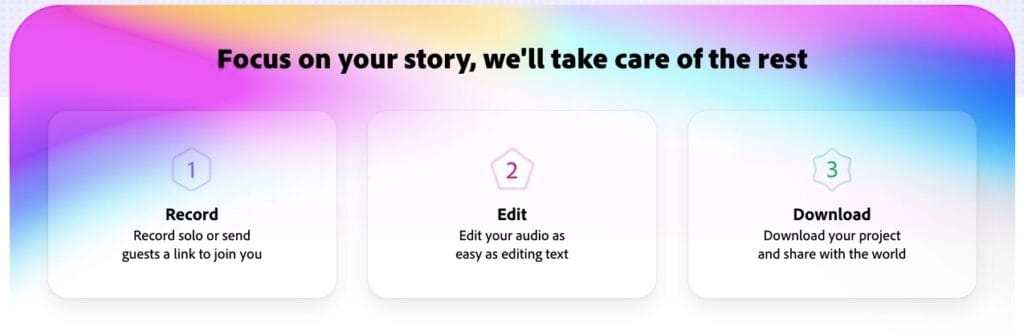
Plans to record your show with Adobe Podcast vary between paid and free, but the free plans enable you to get going with very little setup, although the free plan will limit you to 30-minute downloads, so if you’re doing a longer interview, you might need to get creative to avoid paying for a paid plan.
Whichever software you choose to record your podcast episode remotely, please take some time before the interview to make sure you know how to use the platform. There’s nothing worse than not knowing how to use a tool when someone is giving up their time to interview for your show.
Related Post >> How To Be An Amazing Podcast Guest
How to Record a Podcast Interview Remotely for Free
All of the recording platforms that I mentioned above have free plans.
If you skipped the section above, podcast recording platforms that have free plans are:
- Descript
- Riverside.fm
- Zencastr
- Streamyard
- Adobe Podcasts
All of the above suggestions record locally and provide way better audio and visual quality than if you used a product such as Zoom or Google Meet that really aren’t designed for video and audio production in the same way.
Before settling on a free plan with any recording platform, though, I’d always recommend comparing different free plans.
There are a few things worse than recording an interview and then finding that you’ve gone over your limit for the free plan, and then needing to pay just to download it. Or that you wanted to apply a feature that is associated with the plan two plans higher than what you’d be willing to pay if you moved off the free plan.
Can I Record a Podcast Interview Remotely on Zoom?
You can, of course, use conference tools such as Zoom, Google Meet, Microsoft Teams, etc, to record your podcast episodes. In fact, when I first started my first podcast, I did use Zoom for earlier guest interviews.
But…
And this is the big but…
There are some big downsides to using conference tools such as Zoom to record your podcast interviews. You see, they were made for conferences and video chats, not for the recording of podcasts and YouTube videos.
There have been some big leaps forward from when conference tools were first used by podcasters to record remote interviews. But some of these tools do not have the settings to be able to record as high quality audio and video as software made for this purpose.
When it comes to editing, you will also need to find a separate platform to edit on because you won’t be able to do it on Zoom, etc.
It can also be harder to isolate sounds from different speakers.
For example, with the recording tools mentioned above (Descript, Riverside, etc), you’ll get a track per speaker. And this means that if someone makes a noise (such as coughing) whilst the other person is speaking, it’s easier to cut that out from the one track, leaving the other track clean. It’s much harder to do this when all of the noises and sounds are on one audio files (which is what Zoom etc will give you).
Obviously, it’s down to you, as the podcaster, at the end of the day, to choose which tool you use to record a podcast interview remotely. And you can, of course, use conferencing tools such as Zoom. But you do need to be mindful of the limitations of these tools, and I would recommend trialling different tools that are designed for recording podcast interviews to find one which will work best for you in the longer term.
Related Post >> Do You Have To Pay Your Podcast Guests?
How to Get the Best Sound from Your Podcast Guest
Regardless of which platform you use to record your podcast interview on, there are a few things you can do to help get the best sound from your podcast guest.
- Recommend that your guest uses a microphone that is separate to the one built into their laptop or computer. Even if it’s a microphone attached to headphones, it’ll pick up and record the sound better than without.
- Ask them to wear headphones as this’ll help prevent their microphone from picking up your voice.
- Make sure they’re sitting somewhere where they’re comfortable. When we’re comfortable, we’re more relaxed, and the conversation will show this.
Related Post >> Podcast Guest Release Forms: Why You Need One and How to Write Them
5 Tips to Record a Podcast Interview Remotely
In this next section of the post, we will focus on how to host a podcast interviewer so that you can get the most out of your guest. We will cover:
- How to build rapport with your podcast guest
- How to start your interview
- Why it’s important to listen, take notes and ask follow-up questions that go off-script
- Interviewing a guest remotely
- Creating an comfortable environment for interviewing
1. Create a Comfortable Environment for Interviewing
This might sound nearly impossible when you’re recording a podcast remotely; after all, you have no control over your guest’s environment.
However, there are a few things you can do to help you and your guest have a comfortable recording experience:
- Make sure that you’re comfy. Yes, you need to be in a place that is good for recording, i.e. quiet with no distractions, but if you’re comfortable, you’re more likely to bring a warmer and for relaxed presence to the interview.
- Make sure your guest is comfy. Before hitting record, check that they have everything they need (such as a drink, notes, headphones, tissues…), before you hit record.
- Ask your guest if they have any last minute questions and answer these before you interview.
- Remind your guest that it’s ok if they make a mistake. That’s what editing is for.
- Explain to your guest if there’s anything tech-y that they need to do regarding the recording. This could be as simple as ‘don’t leave the call until I’ve seen that the recording has been uploaded and saved in full,’ but telling your guest anything they need to know about the technical side of the recording can help put their mind at rest.
Related Post >> Why Do Podcasters Wear Headphones? 2 Reasons Why You Should
2. Build Rapport with Your Podcast Guest
It’s really obvious when podcast hosts just go straight into an interview without building any rapport with their guest first.
I’m not saying that you need to be best friends with someone before you interview them, but taking the time to get to know the person outside of the interview before you record can go a long way.
Building rapport can happen in different ways and could include:
- Having a candid chat with your guest before you hit record on the interview
- Having some back-and-forth emails to build that relationship before you start talking face-to-face
- Connecting via direct messaging, comments, or text messaging prior to the interview
Obviously, you should only connect with someone as much as you feel comfortable with. If you keep your social media private, then don’t feel that you need to be connecting with someone who you don’t know on there.
Equally, building a rapport doesn’t mean that you need to get into the nitty-gritty details of life.
It could be that the conversation sticks to the same topics you’ll be interviewing your guest about, but having that rapport with them beforehand means you both have an understanding of who the other person is and how you might want to direct the interview once you are recording.
3. Introduce Your Guest Without Wasting Interview Time
Introducing your guest on your episode is a crucial part of the interview. After all, some listeners might be showing up to listen to your guest, but depending on who your guest is, they might not pull in much of a crowd to the show (if any).
Think about it: Madonna will need a very different introduction (i.e. basically none) compared to Beth, the business coach who started her coaching business 3 months ago.
Therefore, you need to be able to introduce your guest so that your audience knows why they’re there and why they’re the best person to listen to about the topic you’ve bought them onto your show to discuss.
However, what listeners don’t want if for you to read off the guest’s entire resume or social media profile as a way to introduce them. And this is where so many podcaster go wrong because they are essentially giving the listener so much information to validate and vet the guest being there.
But as the host of the show, vetting a guest is your job, not your listeners’.
When introducing your podcast guest, you want to keep it short and relevant to the episode you’re delivering. If you wanted to dive into more tips on introducing your podcast guests, there’s a whole blog post on that linked below.
Related Post >> How to Introduce Podcast Guests & Keep Your Audience Engaged
4. Actively Listen to Your Guest
Ok, listening.
This is a big one.
You’ve got this amazing guest on your show, they’re chatting away either sharing their experiences or their expertise, whatever it may be, and then you do one of the following two things:
- You either affirm what they’re saying, whilst they’re talking
- You interupt them (maybe not rudely, but an interuption is still an interruption), to tell them about your own experience based on what they’ve just said
Here’s why you don’t want to do either of these things:
Affirmations
Affirmations make for bad listening from your listener’s point of view. After all, your audience want to be able to listen to your guest without having to put up with random ‘mmm’ of ‘ahh’ noises from you.
Sure, you want to sound engaged with your guest and perhaps provide a little encouragement as they speak, but those random noises don’t often come across well to your audience.
Interruptions
Interrupting your guest to relate what they’re saying to you can come across as either bad manners or just unnecessary.
I was listening to a podcast recently (no shade, so I won’t name names, this is just observation!), but everything the guest said, the host somehow had a story to bring what the guest was saying back to themselves. I don’t usually listen to that particular show and I’d only joined in to listen to the interview as I’m a fan of the guest.
What I was there for was to hear about that guest’s experiences.
What I wasn’t there for was to hear about how the host somehow thought that everything the guest said was relatable to her.
It was forced, it was off-putting, and I ended up not being able to listen to the interview.
Remember, your listeners are there for the content of what your guest can provide. Stop trying to make yourself relevant; you’re hosting, not being interviewed yourself.
And yes, I’m not perfect, I’ve been there before. And it’s ok if you have too. But you need to remember why your audience is showing up for that episode in the first place. Most likely, it’s to hear from your guest.
Your job as the host is to guide the interview, not insert yourself into the answer part of the question and answer.
5. Ask Follow-Up Questions That Are Off-Script
Off the back of the previous point about not interrupting, if there are follow-up questions that you can ask off the back of what you guest has just said.
This will require some active listening and you having a pen and paper ready for you note down questions as they come to mind whilst your guest is talking.
If you do go off-script with any pre-prepared questions, I like to ask before the recording starts if my guest will be ok with this. Some people are happy to go in the direction the conversation goes, but for others, going off from what have prepared can throw them and means that you might not get the best out of the interview.
When it comes to follow-up questions, it’s great to go off-piste from the plan, but be respectful of your guest and make sure that they’re happy with you doing this before you blindside them with questions that they weren’t necessarily prepared for.
Final Thought on Recording a Podcast Remotely
Recording a podcast interview remotely requires skills for not only planning and hosting an interview, but also for using the right tool to record that podcast interview.
Knowing how to record a podcast interview remotely could be a huge benefit to your podcast, even if you don’t run interviews yet. You never know how your show might develop in the future.
Like anything, though, before you dive in with buying a subscription to a tool to record remotely, take advantage of the free plans and trial a few before settling on what you like best. And remember, what works best for you might not be the one that ‘everyone else’ recommends.
Beyond choosing the right recording tool for you, making sure your guest knows how to best set up their own recording space (we already mentioned microphones and headphones) will help you get the best audio out of the interview.

Verity Sangan
Hey! I'm Verity. I love all things podcasting and am passionate about helping more women to find their voice through podcasting. When I'm not working or busy with mum duties, I host Podcasting for Indie Podcasters (formerly The Lazy Girl's Guide to Podcasting).